
Cove vs Ring 2026 Comparison - Everything You Need to Know
Cove vs Ring compared after hands-on testing of both systems. I cover equipment, cameras, monitoring plans, pricing, and which system I actually recommend.

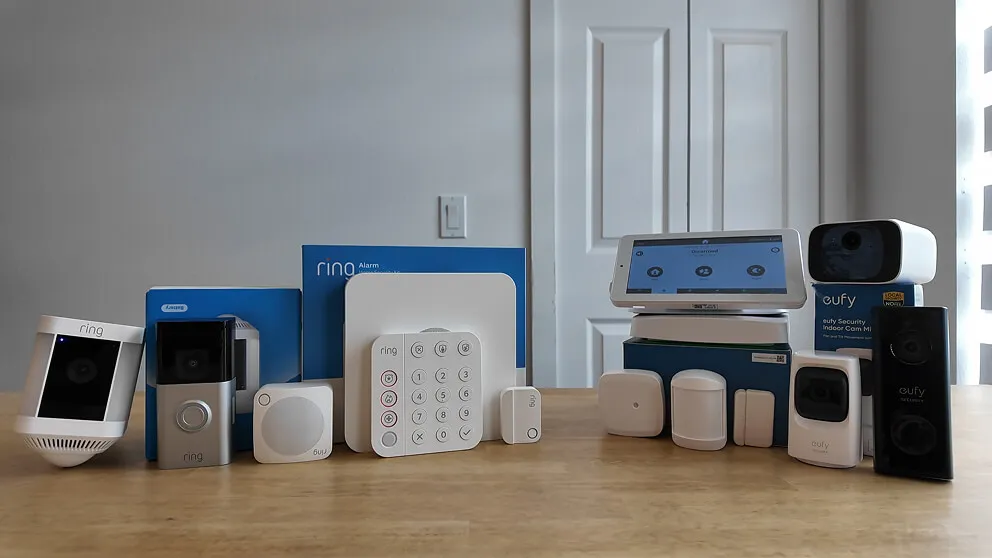
If you're trying to decide between Cove and Ring, then this is the article for you. I've reviewed each system individually so by the time you have finished reading this you'll know everything you need to know if Cove is a better fit for you or if you should just go with Ring instead.
I've installed in my house and every used both at the same time for a little while. I went through the setup, tested all the features in order to get a good understanding of th e pros + cons for each system.
The short version: both are solid DIY systems and neither is a bad choice. But they're built for different buyers, and picking the wrong one means either overpaying for features you don't need or missing out on something you actually care about.
I do slightly lean more towards Cove as the better system which I'll explain in more detail.
Here's the full breakdown.
Cove vs Ring at a glance
| Feature | Cove | Ring |
|---|---|---|
| Monthly monitoring | $23.99 - $33/mo | $25/mo |
| Equipment cost | $250 (70% off) | $350 ($150 off) |
| Touchscreen keypad | Yes | No |
| Two-way voice in panel | Yes | No |
| Cameras proprietary | No (Eufy) | Yes |
| Virtual Guard | No | Yes ($99/mo) |
| 24/7 continuous recording | No | Yes (+$3/mo per camera) |
| Self-monitoring option | Yes | Yes (free) |
| Can record without wifi? | Yes | No |
| Z-Wave smart home support | No | Yes (limited) |
| Contract required | No | No |
| Cellular backup | Yes | Yes |
What both systems came with
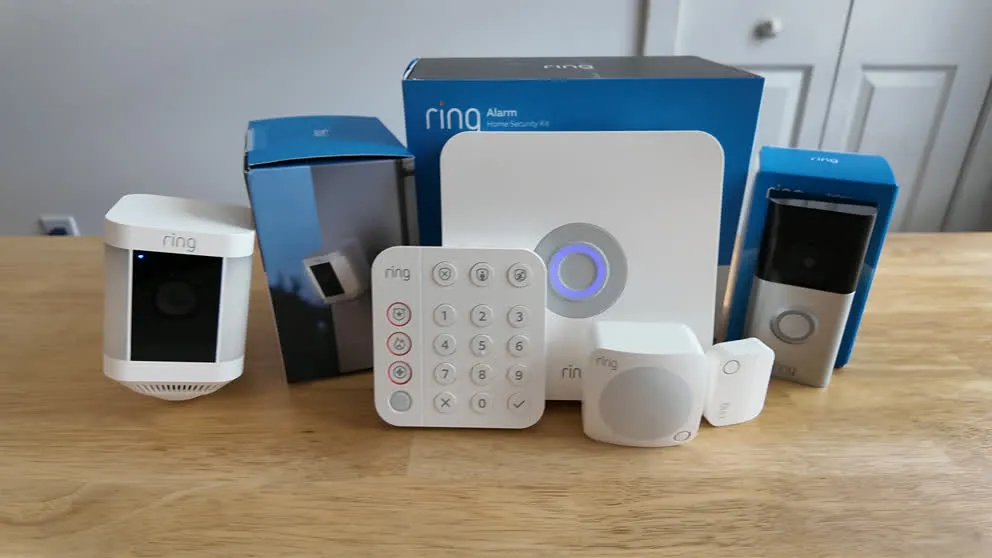
Both systems arrived with the same core setup: a base station, keypad, door and window sensors, motion sensor, glass break sensor, outdoor camera, and doorbell camera. The Cove package I bought also threw in a free indoor camera, which Ring's kit did not include (Ring does sell indoor cameras separately).
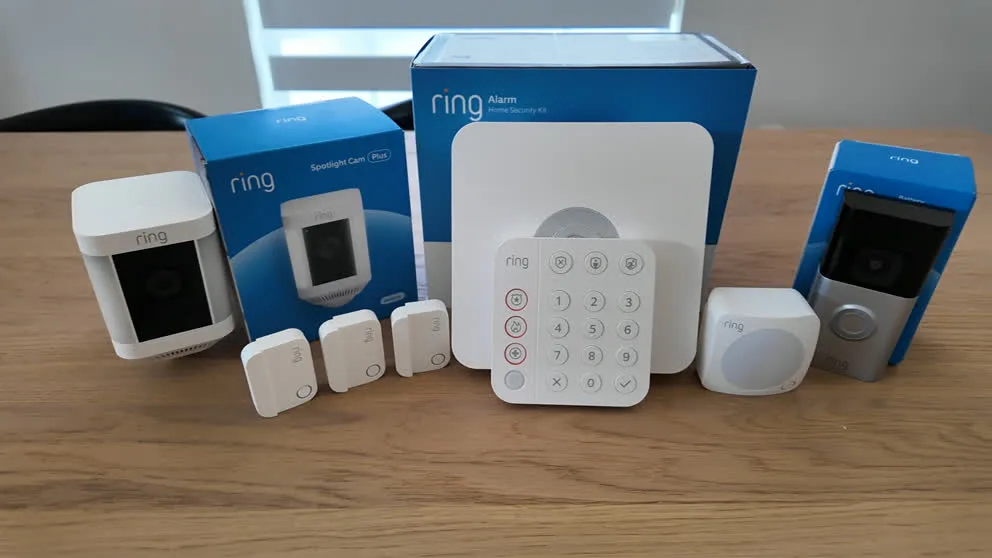
The Ring Whole Home Enhanced Kit, unboxed and ready to set up.
Both are monitored 24/7 for police, fire, and medical. Both run on Wi-Fi with cellular backup, so if your internet or power goes out, you'll still have monitoring. No landline is required. Both are month-to-month with no contracts, so you can cancel anytime with no penalty.
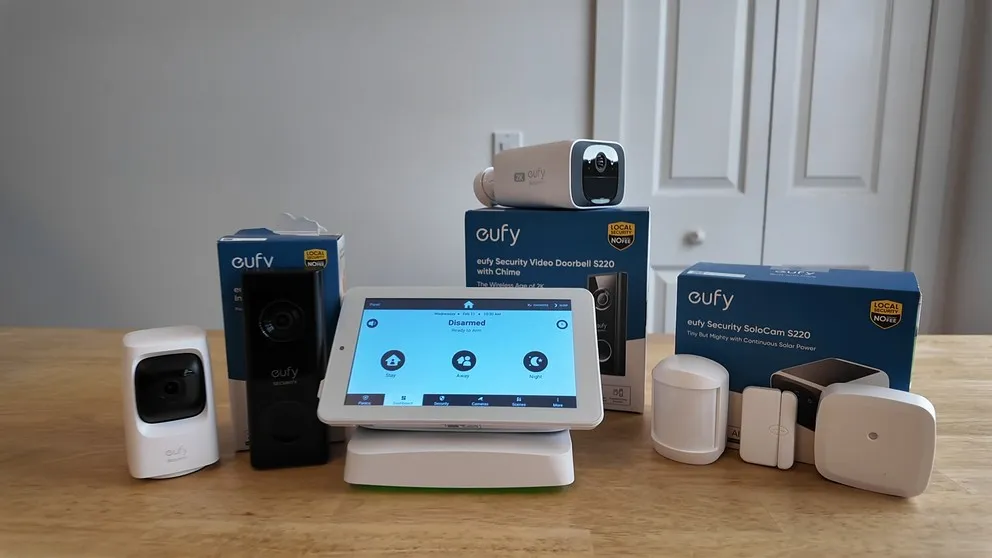
My Cove system that I purchased. It came with more sensors, I just included one of each to save room.
So on paper these two systems may look the same, but if we take a closer look at each piece then we will start to see some real differences.
Comparing Security Equipment
The keypad
This is one of the bigger differences between the two systems, and it's one Cove clearly wins.
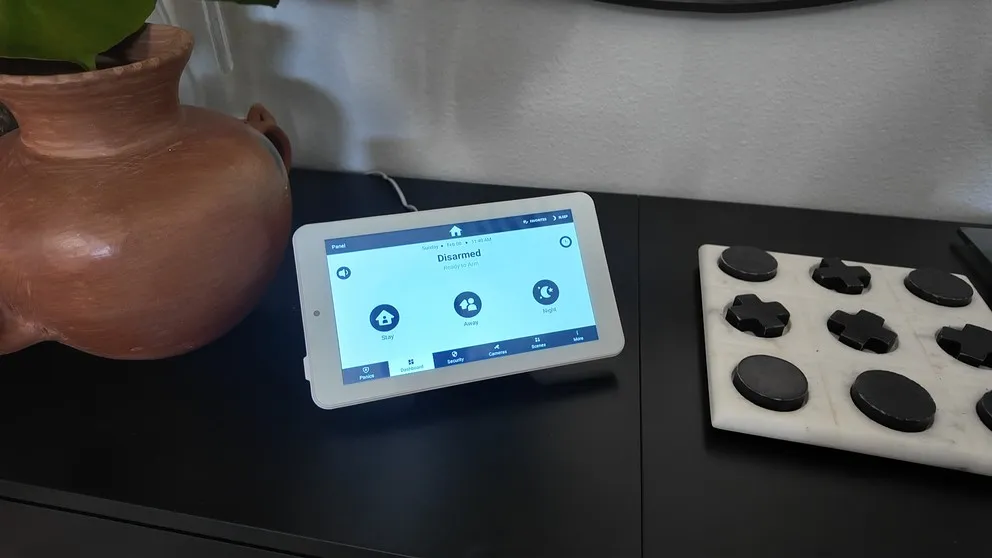
Cove's keypad is a touchscreen with a built-in stand so you can set it on a table or nightstand without mounting it to a wall. From the panel itself, you can watch camera feeds, change settings, and update your PIN. It's just a lot easier to use than Ring's push button style keypad.
Ring uses a traditional push-button keypad. It works, but it's designed to be wall-mounted and there's no screen. If you want to do anything beyond arming and disarming, you're going to the app. That's fine for most people, but Cove's panel is genuinely nicer to use.
The Cove touchscreen panel. You can use it as a standalone device on any flat surface.
The other thing Cove's panel has that Ring's doesn't is two-way voice. The benefit to this is when an alarm goes off, the monitoring center will try to call you on your phone. But if you can't answer your phone (because, say, you're hiding in a closet during an actual break-in), the monitoring agent can speak directly to you through the panel. Unfortunately, Ring doesn't have that. It's one of those features you hope you never need, but it's a meaningful difference in a real emergency.
Sensors
Both systems cover the basics: door and window sensors, motion sensors, glass break sensors, smoke detectors, CO detectors, flood sensors, and panic buttons. Both stick on with adhesive, which makes them renter-friendly and easy to move.
To be honest, there isn't much to compare here. They both function the same and installed the same. No complaints for either system.
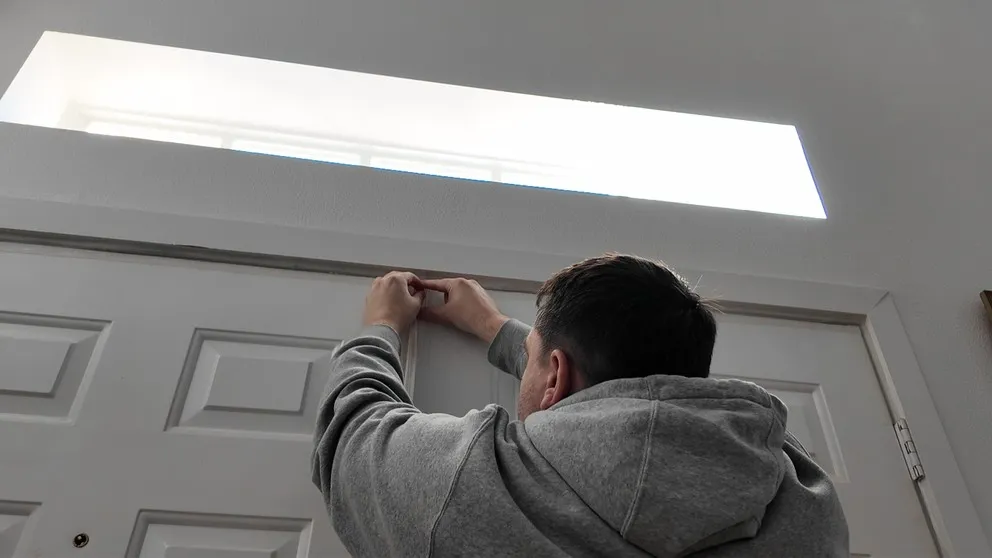
Installing Cove's door sensor above a door frame. Peel and stick, no drilling.
Cove vs Ring camera Comparasion
This is where I spent the most time comparing the two, so let me break it down properly.
Cove cameras
Cove partners with Eufy for their cameras. You get three options: an indoor camera, a solar-powered outdoor camera, and a doorbell camera. The quality is high definition with night vision and two-way audio. Motion triggers a recording clip, which then shows up in the app.
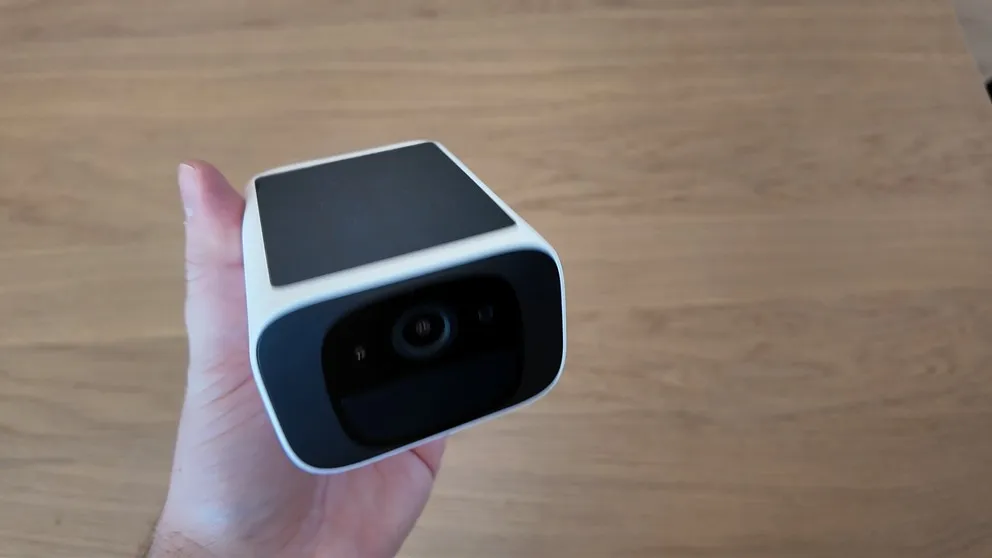
The Cove outdoor camera is a Eufy SoloCam. The solar panel on the back means you never have to charge it.
A few things stood out to me about the cove security equipment on the camera side:
The outdoor camera runs entirely on solar power. I haven't had to charge it once since I set it up. Ring's outdoor camera can run on battery with a solar attachment as an add-on, but Cove's has it built in.
Every Cove camera has an SD card slot. That means if your Wi-Fi goes down or the power cuts out, the cameras keep recording locally. Ring cameras stop recording the moment they lose internet. That's a real advantage for Cove, especially during severe weather or if someone cuts your power before a break-in.
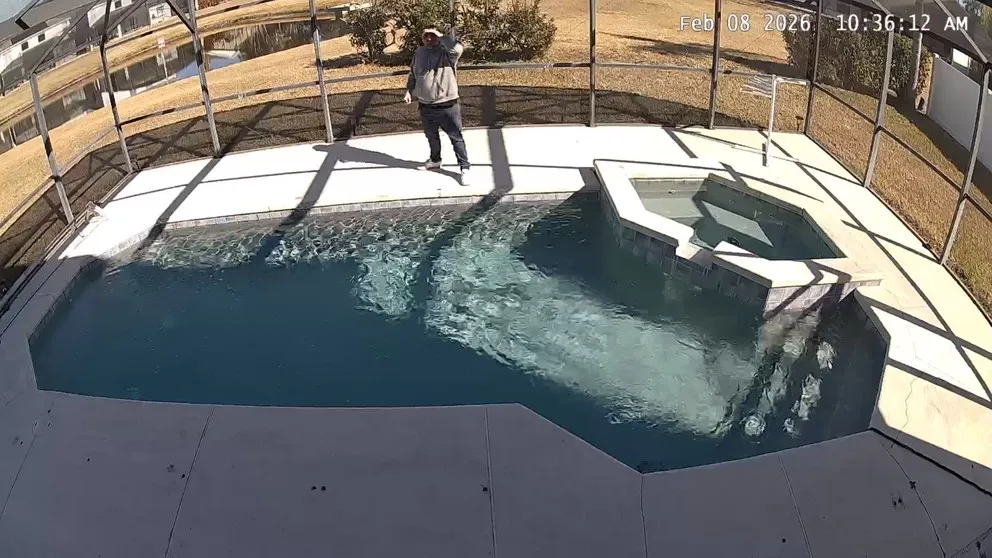
The Cove outdoor camera covering the backyard. Completely wireless and solar-powered.
Cove cameras also aren't proprietary. If you ever cancel your Cove monitoring subscription, you can re-add the cameras to the Eufy app and keep using them for free. That's a meaningful difference from some other security brands where canceling service means losing access to hardware you paid for.
The cloud storage situation with Cove is less impressive. You get one day of free cloud storage. If you want 30 days of clips, it's $2.99 per month per camera through Cove Cloud+. Most people I'd imagine would just rely on the SD card and skip the extra subscription.

Night vision on the Cove outdoor camera. Clear and detailed.
Cove doorbell
The cove doorbell is an Eufy doorbell camera. Battery-powered, HD video, two-way audio, motion alerts. It can also be wired into your existing doorbell wiring if you have it. It does everything you'd expect from a modern video doorbell.
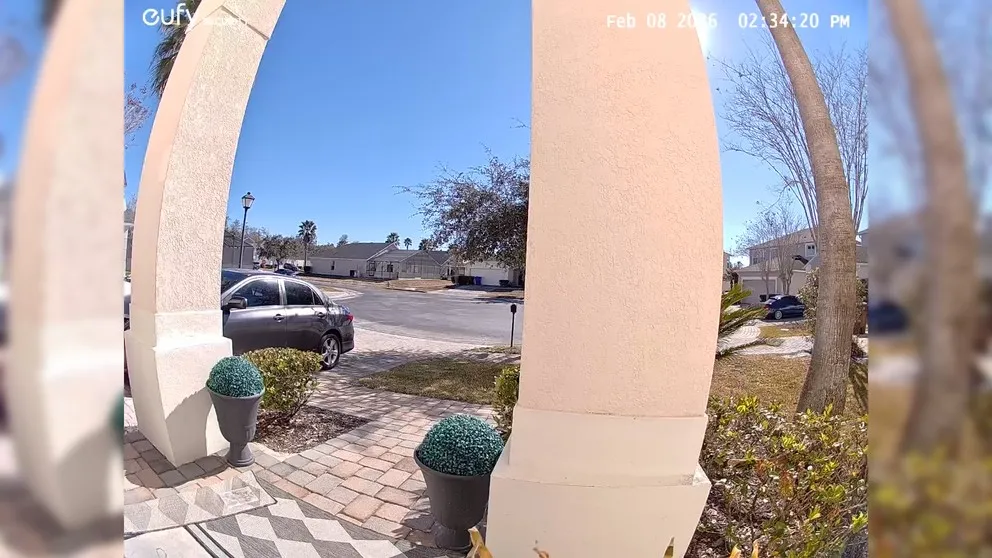
The Cove doorbell camera installed on the front porch.
Ring cameras
Ring's cameras are excellent. They've been in this game long enough to get the details right. HD video, night vision, two-way talk, AI-powered notifications. That last part is actually one of my favorite things about Ring. Instead of just telling you "motion detected," the app will say something like "Amazon driver dropped a package" or "person at the front door." It sounds like a small thing but it saves a lot of unnecessary check-ins.
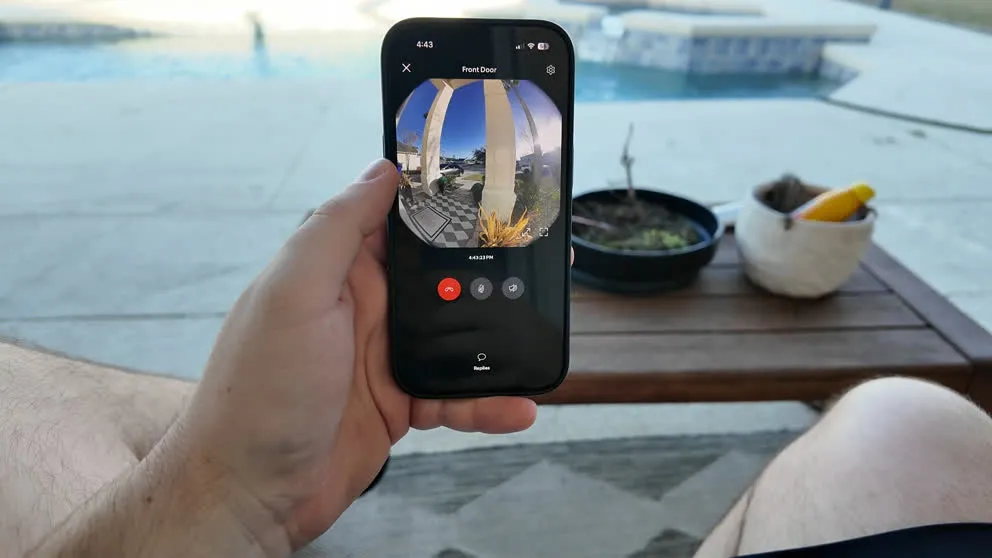
The Ring app showing a live view from the doorbell camera.
Ring also offers something Cove doesn't: 24/7 continuous recording. For an extra $3 per month per camera, you can have the cameras record non-stop instead of just capturing motion clips. Cove doesn't have a continuous recording option at any price.
The other Ring exclusive is Virtual Guard at $99 per month. That's a service where real monitoring agents watch your outdoor cameras around the clock. If someone is casing your house, walking around the property, or acting suspicious, the agent can see it, talk to them through the camera, and dispatch police before anything happens. Most security systems (including Cove) are reactive. Virtual Guard is proactive. It's expensive, but it's genuinely a different tier of security.
One thing I do want to mention: Ring is owned by Amazon, and with that comes privacy concerns some people have about how footage is stored and who can access it. There was a Super Bowl ad where they used AI to find lost dogs, and it made people think about what else that technology could be used for. Personally I'm not bothered by it, but I know some people are, and it's worth knowing before you buy.
Camera price comparison
| Camera | Cove | Ring |
|---|---|---|
| Indoor | $59.99 | $79.99 |
| Outdoor | $129.99 (solar) | $99.99 (Stick Up Cam, battery) |
| Video doorbell | $99.99 | $100+ depending on model |
Cove's cameras are roughly half the price of Ring's in most cases, and the quality difference is minimal for everyday use. If price is a factor, Cove gives you more camera for less money.
Installation
Both are DIY. You download the app, follow the step-by-step setup, and you're done. No technician, no tools beyond maybe a screwdriver for the doorbell.

Peeling the adhesive backing off a Cove sensor. Most of the install is this simple.
Cove took me about two hours. Ring took about three, mostly because I had trouble getting the outdoor camera to connect. It eventually worked fine and I haven't had issues since, but the initial setup was a bit frustrating. Cove's camera setup was a little easier, though both have some quirks when it comes to getting cameras onto the network.
Pro tip: If a camera won't connect during setup, try moving it closer to your router before placing it in its final spot. Both Cove and Ring cameras can be finicky if they're too far from the Wi-Fi source during initial pairing.
If you're not a DIY person, Cove uses HelloTech for professional installation starting at $129. Ring uses OnTech (pricing is not publicly listed, you'd need to contact them for a quote). Honestly though, unless you have a lot of equipment or a complicated house layout, doing it yourself is pretty manageable.
Monitoring plans and pricing
How much is Cove monitoring?
Cove has two plans:
| Feature | Cove Basic | Cove Plus |
|---|---|---|
| 24/7 professional monitoring | Yes | Yes |
| Cellular backup | Yes | Yes |
| Smartphone control | Yes | Yes |
| Camera support | No | Yes |
| Alexa/Google voice control | No | Yes |
| Equipment warranty | 1 year | Lifetime |
| $5/mo equipment credit | No | Yes |
| Monthly cost | $23.99 | $33 |
If you want cameras with Cove, you have to go with the Plus plan at $33 per month. Of that $33, Cove credits $5 back to your account each month for future equipment purchases. So the real out-of-pocket cost is closer to $28 per month.
Does Cove require a subscription? Yes, it does. There's no self-monitoring option. If you cancel your monitoring plan, the security system stops functioning. Your Eufy cameras will still work through the Eufy app, but the sensors, panel, and monitoring all go dark. That's one of the bigger practical differences between Cove and Ring.
Does Ring have 24/7 monitoring?
Yes, Ring does offer 24/7 professional monitoring, but it's an add-on rather than the base plan. Ring's pricing structure looks like this:
| Plan | Monthly | What you get |
|---|---|---|
| Free | $0 | Live view, real-time alerts, no cloud storage |
| Ring Protect Basic | $4.99 | 180-day cloud storage for one camera |
| Ring Protect Plus | $9.99 | 180-day cloud storage for all devices |
| Ring Protect Pro | $19.99 | All devices + cellular backup + 24/7 professional monitoring |
Professional monitoring is included in the Protect Pro plan at $19.99 per month. On the Standard and Plus plans it's an optional add-on for an extra $10 per month. Ring's free tier gives you live streaming and notifications, so self-monitoring is a real option if you want to keep costs low.
When you compare apples to apples (both systems with cameras, professional monitoring, cellular backup), the monthly prices are very close. Cove comes to roughly $28 out of pocket. Ring with Protect Pro is $19.99. Add $5 per month if you want carbon monoxide and smoke detection covered and you're at $25. A few dollars either way.
The bigger story is what you're getting for that money, not the price gap.
App experience
Ring's app is better. I'll just say that plainly. The interface is more polished, the AI-powered notifications are more informative, and day-to-day use feels more intuitive. When a camera detects something, Ring describes what it saw. Cove just says motion was detected.
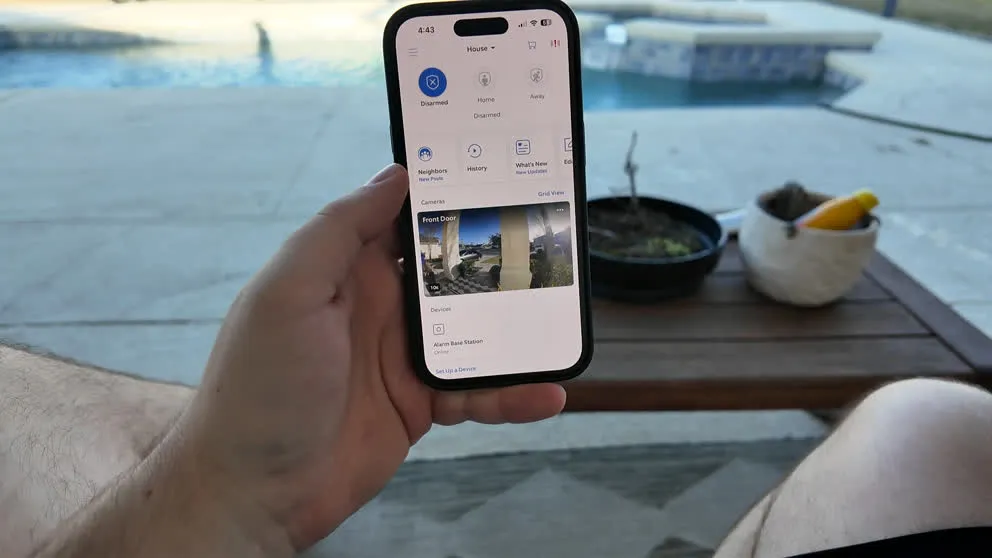
The Ring app dashboard. Clean, responsive, and easy to navigate.
That said, the Cove app does everything you actually need. You can arm and disarm remotely, view live camera feeds, download video clips, talk through the cameras, set up schedules, and manage users. Cove also has a "Recipes" feature that lets you build automations — things like having cameras start recording automatically when a sensor trips, or arming the system on a weekday schedule.
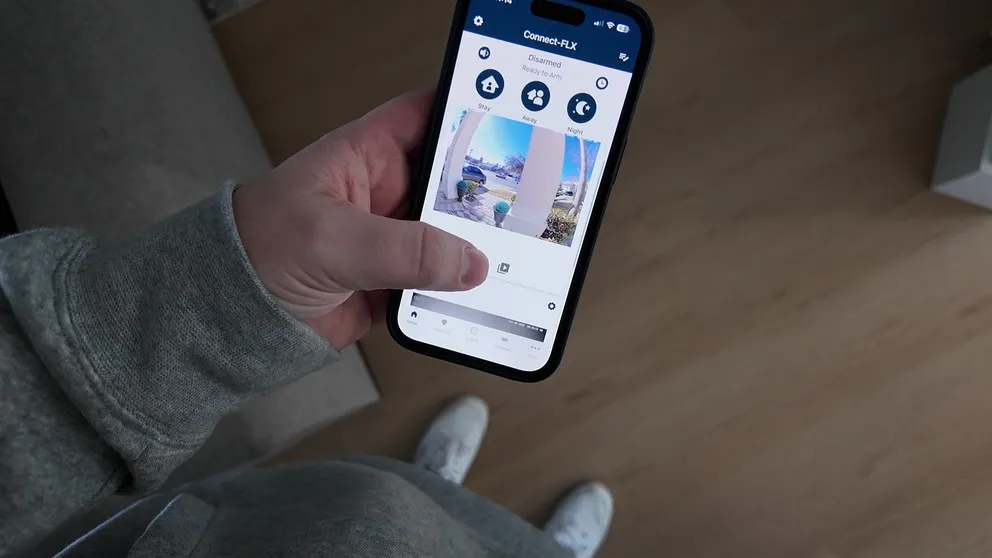
The Cove app. Fully functional, just not quite as refined as Ring's.
Ring's app adds a couple of useful extras. Privacy zones let you mask parts of the camera frame so you're not recording your neighbor's yard. Neighborhood notifications let you share footage with nearby Ring users if you spot something suspicious. Small features, but they show the level of polish Ring has built over time.
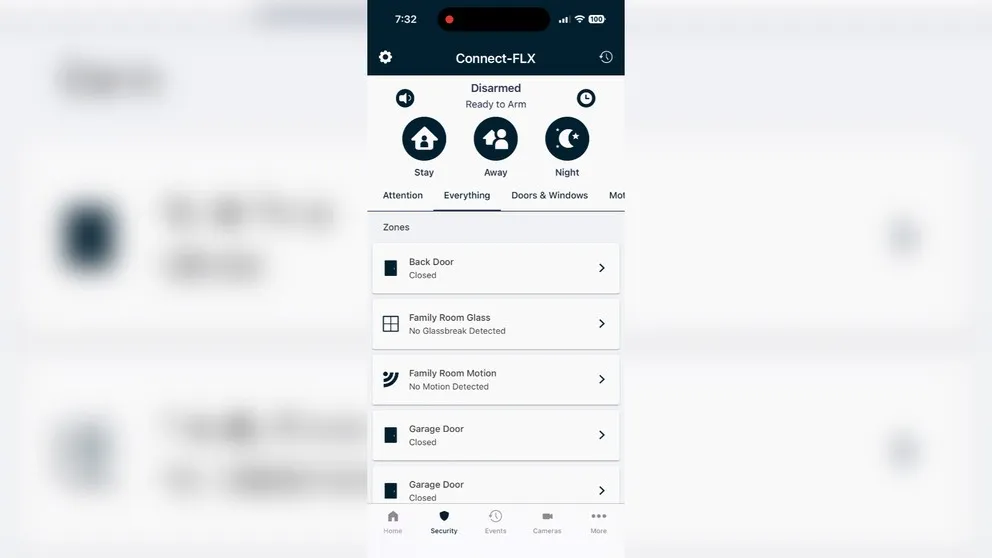
The Cove app's zones view, showing the status of all sensors.
Smart home integrations
This one is a clear Ring win.
Cove is security-only. Door and window sensors, motion sensors, cameras, monitoring. That's the system. There is no Z-Wave support, no third-party device compatibility, and no way to connect smart locks, thermostats, or light switches.
Ring supports Z-Wave devices, which means you can (in theory) connect smart locks, thermostats, and light switches through the Ring app. I spent a fair amount of time trying to get a Z-Wave door lock connected and couldn't get it to work. It's worth noting that Ring's Z-Wave integration works most reliably with Ring-sold devices. It also doesn't connect to Nest thermostats. So the smart home story for Ring is better than Cove's, but it's not seamless either.
If you're looking for full home automation with security tied in, neither system is really built for that. You'd want to look at something like ADT or Vivint. But Ring at least gives you the option to try.
Customer support
Cove surprised me here. Their support is available 24/7 by phone and webchat, and when you reach out you get a real person. When I had a syncing issue with a camera, the agent walked me through the fix rather than just sending me a link to a help page.
Ring's website has a chat button on every page, but it goes to a bot. Getting to a real person means calling, which is also available 24/7. It works, but the experience is less smooth than Cove's.
Who should get Cove?
Pros
- Best Value. High Quality Equipment for the Price
- Touchscreen keypad panel
- Super easy DIY installation
- Two-way voice built into the panel for emergency communication
- Cameras record locally via SD card even without Wi-Fi
- Cameras can still be used if you cancel the service
- Add unlimited cameras without increasing monthly bill
- Renter-friendly, wireless sensors remove cleanly with no residue
Cons
- No home automation
- Connecting the cameras on install is frustrating
- No 24/7 video recording recording
- No power over Ethernet option for cameras
- Mobile app not quite as polished
Cove is the better choice if you're starting fresh and want solid security at the lowest upfront and monthly cost. The touchscreen keypad is genuinely better than Ring's. The two-way voice in the panel is a feature you don't find on most systems. The cameras are half the price of Ring's and almost the same quality. The solar outdoor camera means zero maintenance. And the SD card recording is a real backup if your internet gets cut.
If you don't have any existing Ring cameras or devices, and you're not specifically interested in Virtual Guard or continuous recording, Cove gives you more for less. 70% OFF + Free Indoor Camera.
The main thing to know: Cove requires a monitoring subscription. The system won't work without one. If you want the option to self-monitor, Cove isn't the right fit.
Who should get Ring?
Pros
- Low Monthly Price
- Easy DIY Installation
- Excellent camera quality with night vision and two-way talk
- Video storage up to 180 days
- AI-powered notifications with descriptions
- Great mobile app — smooth, responsive, easy to use
Cons
- Camera Privacy Concerns Amongst Customers
- No touchscreen keypad
- No two-way talk through the panel
- Cameras don't record without Wi-Fi
- High equipment cost
- Limited Home Automation Features
- Not compatible with Nest thermostat
Ring makes sense if you already have Ring cameras at home and want to add an alarm system around them. The ecosystem just works together, and you'll get the most out of the app if you're already familiar with it.
It's also the right pick if Virtual Guard is something you want. Proactive, live camera monitoring by real agents is a different level of protection than any reactive alarm system can offer. At $99 per month it's not cheap, but nothing else in the DIY space does the same thing.
Ring also wins if you want the option to self-monitor for free, if you want 24/7 continuous recording on your cameras, or if smart home integrations matter to you.
See Ring's current deals and equipment packages.
The bottom line
I've been happy with both systems, but if I had to pick one for someone starting from scratch, I'd lean toward Cove. Lower upfront cost, better keypad, non-proprietary cameras, solar charging, SD card recording, and two-way voice in the panel. For most households just trying to protect their home, that's a better overall package.
Ring wins on app polish, smart home support, continuous recording, and Virtual Guard. If any of those are priorities for you, Ring is worth the extra cost.
Either way, you're getting 24/7 professional monitoring, cellular backup, no contracts, and easy DIY installation. You're not making a bad decision with either system.
>> Cove Promo: 70% OFF + Free Indoor CameraIs Cove a good security system?
Yes. Cove is one of the best-value DIY home security systems available right now. It includes 24/7 professional monitoring, a touchscreen panel with two-way voice, solar-powered cameras with SD card backup, and no contract. Their 70% off equipment sales make the upfront cost especially hard to beat.
How much is Cove monitoring per month?
Cove has two plans. The Basic plan is $23.99 per month and covers security monitoring without camera support. The Plus plan is $33 per month and includes cameras, Alexa/Google voice control, a lifetime warranty, and a $5 monthly equipment credit that accumulates for future purchases — making the effective cost closer to $28 per month.
Does Cove require a subscription?
Yes. Cove requires an active monitoring plan ($23.99/mo minimum) for the security system to function. If you cancel, your sensors and alarm panel stop working. Your Eufy cameras, however, will still function through the free Eufy app since they're not proprietary to Cove.
Does Ring have 24/7 monitoring?
Yes. Ring offers 24/7 professional monitoring through their Ring Protect Pro plan at $19.99 per month, which includes cellular backup. On the Standard and Plus plans, professional monitoring is available as an add-on for an extra $10 per month. Ring also offers a free self-monitoring tier with live view and alerts but no cloud storage or professional monitoring.
Are Cove cameras any good?
Yes. Cove's cameras are made by Eufy and offer HD video, night vision, two-way audio, and motion-triggered recording. The outdoor camera runs on solar power so you never need to charge it, and every camera has an SD card slot so it keeps recording locally even if your Wi-Fi goes down. The image quality is comparable to Ring at roughly half the price.
Can you use Cove cameras without a subscription?
If you cancel Cove, the security alarm system stops working, but the Eufy cameras can be re-added to the free Eufy app. You'll lose integration with the Cove monitoring system but keep access to live viewing and local SD card recordings.
What is Ring Virtual Guard?
Virtual Guard is a $99 per month add-on where Ring's monitoring agents actively watch your outdoor cameras. If they spot suspicious activity — someone casing your property or approaching in an unusual way — they can speak through the camera to address the person and dispatch police if needed. It's a proactive form of monitoring that most home security systems, including Cove, don't offer.
Which is cheaper, Cove or Ring?
Cove is typically cheaper on equipment upfront, especially with their frequent 70% off sales. On monthly cost, the two systems are very close when you compare equivalent plans with professional monitoring and cameras — roughly $25 to $28 per month. Ring's free self-monitoring tier is the only way to get meaningful savings on the monthly side.
About the author
