
Vivint vs Ring 2026 Comparison - Hands-On Testing and Review
I tested both systems in my home. Here's a hands-on comparison of the equipment, cameras, monitoring, smart home features, and pricing.

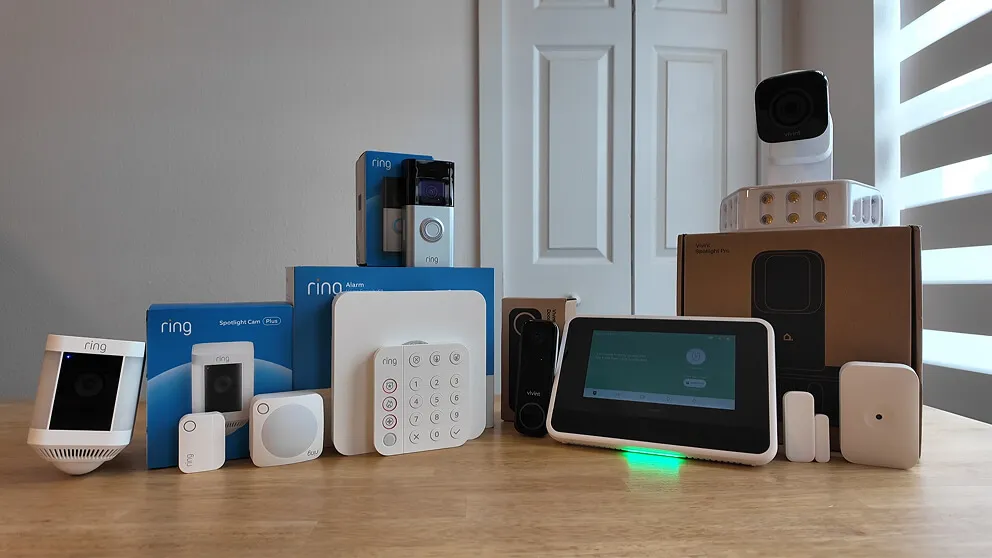
My Vivint and Ring home security systems tested side by side.
I've reviewed the Vivint and Ring security systems on their own, so this time I'm putting them side by side. They come at home security from opposite ends. Vivint is the premium, professionally installed smart home system. Ring started as a doorbell camera company and grew into an affordable DIY alarm system.
If you want my verdict up front, Vivint is the better security system. It has a touchscreen panel, professional installation, straight cellular monitoring, two-way voice through the panel, and smart home automation that Ring can't match. It also costs more, and financing locks you into a service agreement. Ring is a solid budget pick, especially if you already own Ring cameras and want to add alarm monitoring. It's easy to install, it's month-to-month with no contract, and I haven't seen a bigger camera selection anywhere.
Vivint vs Ring At A Glance
| Feature | Vivint | Ring |
|---|---|---|
| Monthly monitoring | $29.99 - $49.99/mo | $20 - $99/mo |
| Upfront equipment cost | $599 - $1,000+ | ~$376 (on sale) |
| Installation | Professional | DIY |
| Contract required | No (but financing requires one) | No |
| Cameras | Proprietary | Ring (non-proprietary) |
| Smart home automation | Full Z-Wave support | Limited Z-Wave |
| Keypad/panel | 7" touchscreen | Basic push-button |
| Monitoring connection | Straight cellular | Wi-Fi first, cellular backup |
| Two-way voice on panel | Yes | No |
| 24/7 continuous recording | Yes ($7/mo) | Yes ($3/mo per camera) |
| Records without Wi-Fi | Yes | No |
What Both Security Systems Came With
My Ring system was the Whole Home Enhanced Kit. It came with the base station, keypad, door and window sensors, a motion sensor, the Ring outdoor camera, and the Ring doorbell camera. Normally $530, I picked it up on sale for $367.
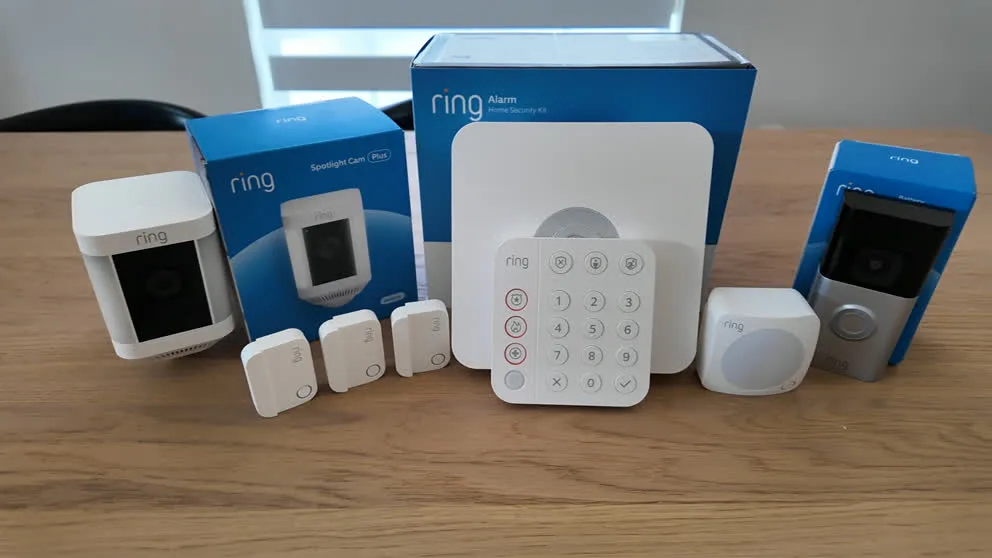
Everything that came with my Ring Whole Home Enhanced Kit.
My Vivint system came with the 7-inch touchscreen panel (base station built in), door and window sensors, a glass break sensor, the Vivint doorbell camera, the Vivint outdoor camera with the floodlight attachment, plus a Nest thermostat and automatic door lock bundled in.
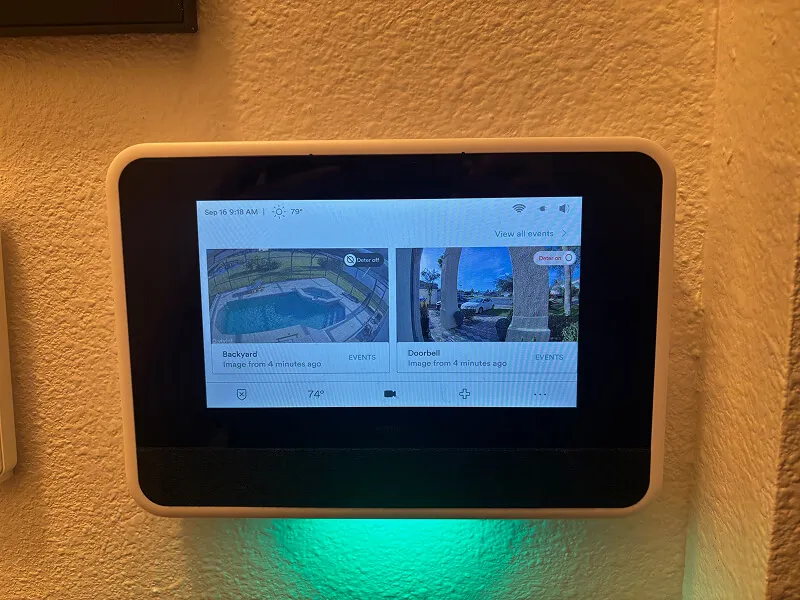
The Vivint 7-inch touchscreen panel. Base station, keypad, and camera viewer all in one.
Both systems monitor 24/7 for police, fire, and medical, and neither needs a landline. Both have cellular connectivity and battery backup, plus the core sensor lineup: door and window sensors, motion sensors, and glass break sensors.
The keypad difference is immediately obvious. Vivint has a 7-inch touchscreen where you can change PIN codes, add devices, update settings, and even watch camera feeds. Ring has a basic push-button keypad that handles arming and disarming and that's about it. I find the Vivint panel much easier to use day to day.
Both companies have deals running right now. Vivint offers $0 activation with professional installation. Ring frequently discounts their Whole Home kits. I'll link to both throughout this review.
Vivint vs Ring Monitoring And Connection
Both systems offer professional monitoring that dispatches police, fire, and medical. Where they differ is how each one connects to the monitoring center.
Ring connects through your home Wi-Fi first and uses cellular as a backup. If your internet drops, Ring Alarm switches to the cellular connection. Vivint goes straight to cellular. It doesn't rely on Wi-Fi at all to contact the monitoring station. If the power goes out and your internet goes down, Vivint is already on cellular without needing to switch. That can result in a slightly faster response time because there's no handoff.
The other big difference is two-way voice on the panel. Vivint's touchscreen has a built-in speaker and microphone. If the alarm goes off, a monitoring agent can communicate with you through the panel itself. During a break-in, you're probably not going to be calmly answering your phone. The agent can hear what's happening through the panel and relay that to the police. Ring doesn't have this. Their agents can only reach you by calling your phone.
Using Existing Security Equipment
Both Vivint and Ring can take over an existing hardwired security system if your house already has one from a previous owner. That's a real money saver since you're not buying new sensors for every door and window.
The difference is that Vivint can also use most wireless sensors from other companies (like Honeywell). Ring can only use their own sensors or a hardwired system. And the Ring hardwired takeover isn't exactly DIY-friendly. It can be done, but it's tricky. Vivint's technician handles all of that for you during professional installation.
Vivint Monitoring Plans
Vivint starts at $29.99 per month for core security monitoring with the app. Smart home automation bumps it to $39.99. Add cameras and you're at $49.99, plus $5 per additional camera. My Vivint bill is $49 per month (monitoring, smart home, and two cameras).
Ring Alarm Monitoring Plans
Ring's professional monitoring starts at $20 per month, which includes 24/7 monitoring, cellular backup, and 180 days of cloud storage for unlimited cameras, which is a good deal. If you want Ring's Virtual Security Guard feature (a live agent watching your cameras), that jumps to $99 per month. There's also a free self-monitoring option where you get app notifications and the siren, but no professional dispatch. I wouldn't rely on self-monitoring as your only security, but it's there if you want to start without a monthly bill.
Contracts
Ring is completely month-to-month with no contract, so you can cancel whenever you want.
Vivint is month-to-month if you pay for equipment upfront. But most people finance the equipment at 0% APR for 42 or 60 months, and while you have a balance, you're obligated to keep the monitoring service active. So financing effectively creates a contract. To cancel early, you need to pay off whatever you owe on the equipment.
Monitoring Verdict
Vivint has the stronger monitoring setup because of the straight cellular connection and two-way voice through the panel. Ring is cheaper and keeps you month-to-month. If monitoring reliability is your priority, go with Vivint. If you want the most affordable professional monitoring with no strings attached, Ring is hard to beat at $20 per month.
Vivint And Ring Camera Comparison
Both systems have solid cameras with HD video, night vision, motion detection, two-way talk, and live viewing from the app. Both record video clips out of the box, with an optional upgrade to 24/7 continuous recording (Vivint: $7/mo flat, Ring: $3/mo per camera).
Camera ownership is where they split. Vivint cameras are proprietary, so if you cancel Vivint, your cameras stop working. Ring cameras keep working through the Ring app even if you cancel Ring Alarm monitoring, which is a real point in Ring's favor.
Ring Cameras
Ring's camera selection is massive: indoor, outdoor, spotlight, floodlight, stick-up, and doorbell cameras. That's more options than any other security company I've reviewed. Most outdoor models also have battery options, so you can stick a camera on a shed or a fence post without running wires.
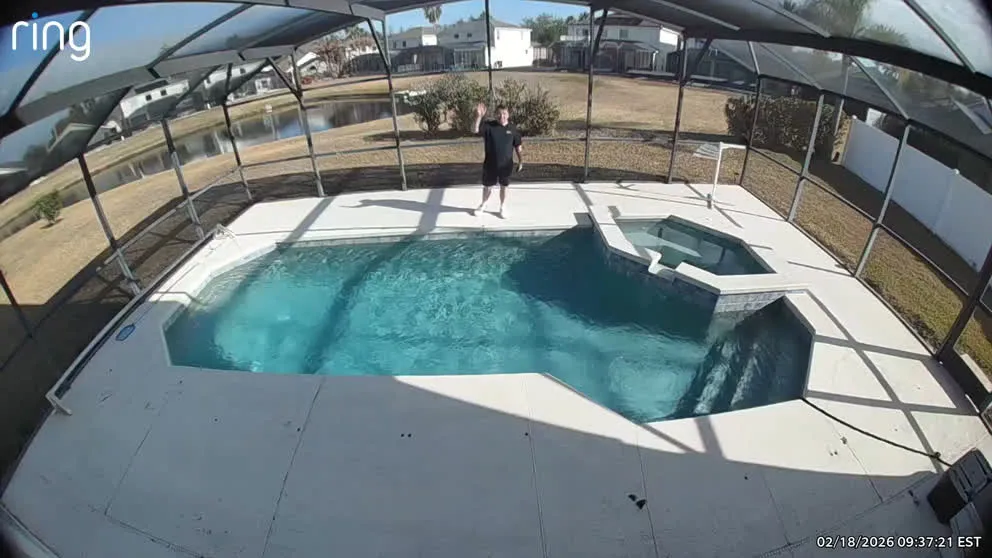
Daytime footage from the Ring outdoor camera. Good quality for a wireless setup.
Ring cameras also have AI-powered notifications that actually describe what triggered the alert. Instead of just "motion detected," you get descriptions like "person approaching front door" or "vehicle in driveway." That cuts down on how often you pull out your phone for nothing.
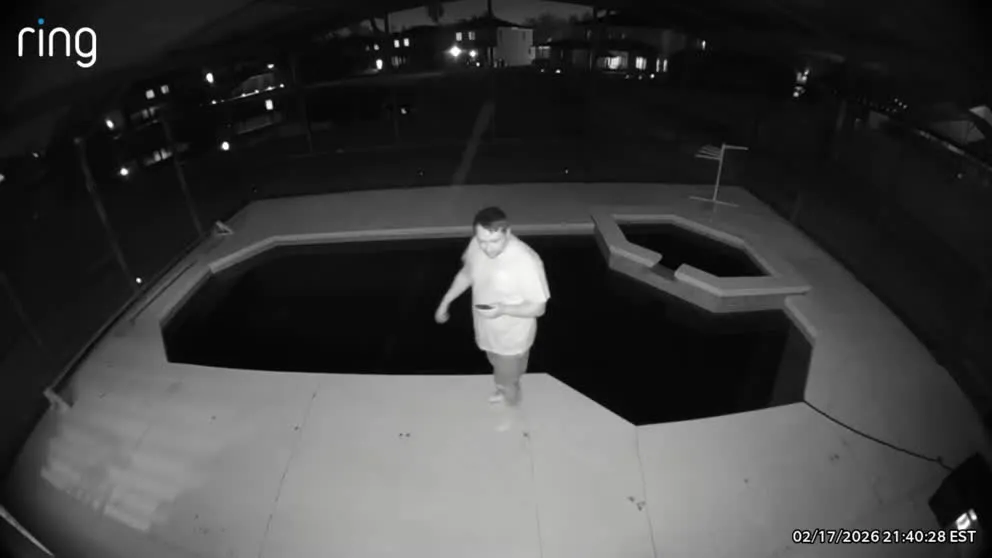
The downside is that Ring cameras stop recording entirely if your Wi-Fi goes out, which could be exactly when you need footage. Ring also offers a Virtual Security Guard service ($99/mo) where a live agent monitors your cameras and can talk to potential intruders through the speaker. It's similar to SimpliSafe's Active Guard. I like the feature, but $99 per month is steep.
Vivint Cameras
Vivint offers fewer camera models (indoor, outdoor with optional floodlight, and doorbell), but the ones they have are a step up in quality. The video is cleaner, the connection is more stable, and the cameras use AI to detect lurkers and differentiate between people, animals, and objects.
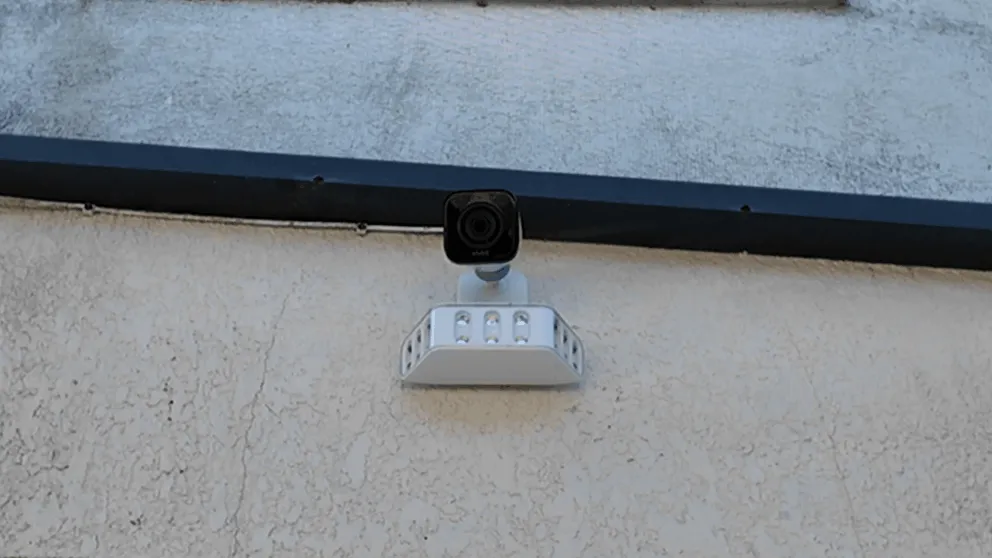
The Vivint outdoor camera with floodlight. Lights up your whole yard.
The big advantage is that Vivint cameras keep recording even without Wi-Fi. If your internet goes down, the cameras store footage locally and you can view recordings from the Vivint panel, while Ring cameras go completely dark.
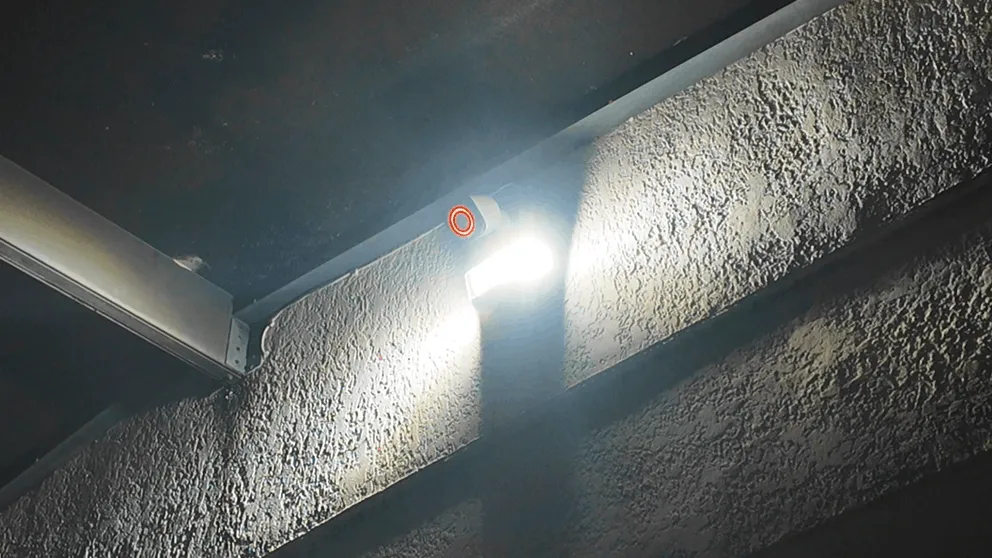
Vivint's deter mode in action. The floodlight, LED ring, and whistle all activate together.
Vivint's deterrence features are automated. When the cameras detect motion in deter mode, they play a whistle sound, flash the LED ring around the lens, and (with the floodlight attachment) light up your entire yard. It's designed to make the intruder look directly at the camera and realize they're being recorded. You don't pay extra for this like you do with Ring's $99/mo Virtual Guard.
The downside is that Vivint cameras need to be plugged in, with no battery option. You can't put a camera somewhere without an outlet unless you run wiring, so Ring's battery-powered cameras give you more placement flexibility.
Camera Verdict
Ring has more camera options, battery flexibility, non-proprietary cameras you keep if you cancel, and AI-powered notification descriptions. Vivint has better video quality, records without Wi-Fi, and includes automated deterrence at no extra cost. If you want the most cameras with the most placement flexibility, get Ring. If you want fewer but better cameras that don't go dark when Wi-Fi drops, go with Vivint.
DIY vs Professional Installation
Installing Ring
Ring Alarm is completely DIY. Download the app, plug in the base station, and follow the prompts to pair your sensors and cameras. The sensors are peel-and-stick. The whole setup took me about two to three hours.
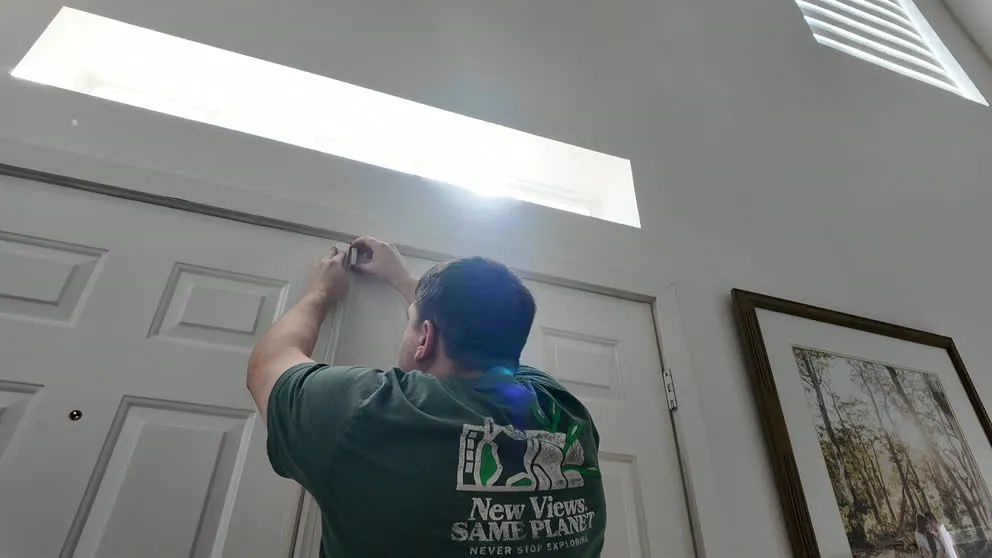
Installing a Ring contact sensor. Peel the adhesive, stick it on, done.
Ring makes the process pretty simple. They put a lot of thought into how someone with zero security system experience would go through the installation. If you've ever used an app to set up a smart device, you'll be fine here. And if you really don't want to DIY it, Ring has a vetted list of third-party contractors who can install for you.
Since everything is wireless, Ring works well for renters. You don't drill anything, and you can take it all with you when you move.
Installing Vivint
Vivint sends a technician who handles everything. They connected all my sensors, set up the panel, tested the system, and installed the outdoor camera with the floodlight. The outdoor camera alone was worth having a pro for. It meant drilling through the exterior wall, running wires inside, and sealing everything up, and I don't want to climb a ladder and do that myself.
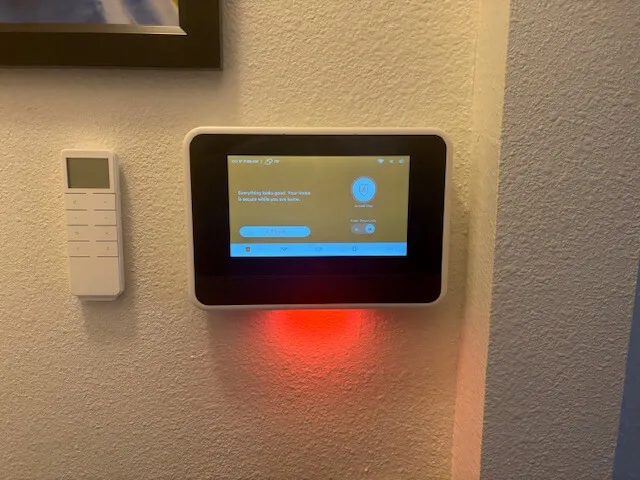
The Vivint panel after professional installation. Done right the first time.
My Vivint installation took about two to three hours. The technician showed me how to use the app, how to arm and disarm, and how to set up automations. There's peace of mind knowing that someone who installs security systems every day set everything up correctly.
Professional installation with Vivint starts around $99, though they frequently waive the fee through promotions. Check Vivint's current installation deals here.
Installation Verdict
Ring's DIY setup is free, straightforward, and works for renters. Vivint's professional installation gets everything done right, especially outdoor cameras that need drilling and wiring. If you're renting or comfortable doing it yourself, Ring is the easier fit. If you'd rather not touch a drill, go with Vivint.
Vivint Smart Home Automation
This is where Vivint pulls ahead by a wide margin. Ring has some home automation support. You can connect Z-Wave door locks, light switches, and certain thermostats. But the range of compatible devices is limited. I couldn't get my Nest thermostat to connect with Ring (it's not compatible). I also tried to connect a Z-Wave door lock that Ring's website listed as compatible, and it just wouldn't sync up despite following all the directions.
Ring's built-in automation is basically nonexistent. If you want automation routines (like "lock the door when I arm the system"), you need to use third-party apps like Alexa routines or IFTTT. It works, but it's clunky compared to having everything built into one app.
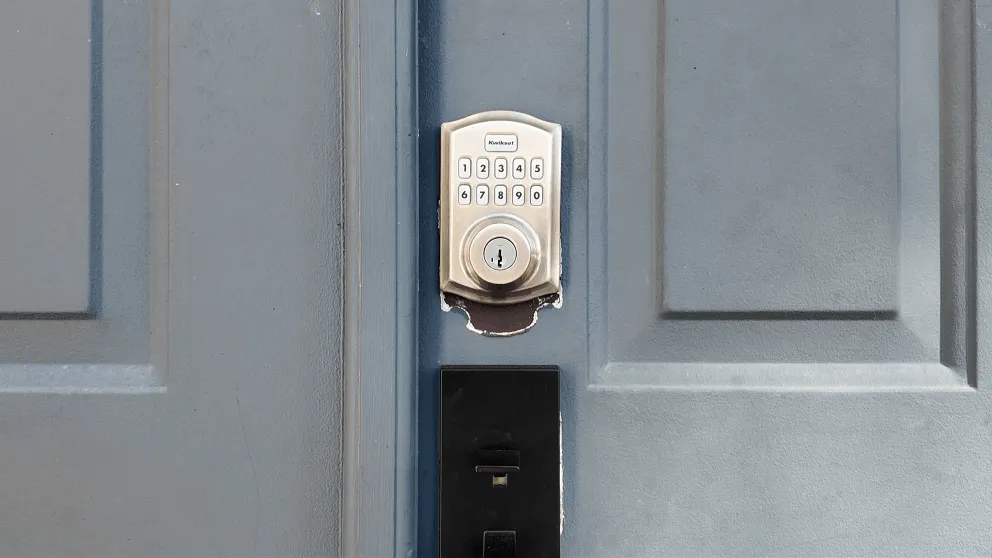
The Vivint smart lock. Lock and unlock from the app, keypad, or automations.
Vivint connects to anything Z-Wave compatible. Door locks, thermostats (including Nest), garage door openers, and light switches all show up in the Vivint app alongside your security system and cameras. You can set up automations directly in the app: Monday through Friday at 9 PM, arm the alarm, lock the front door, and turn off the lights. Any device can trigger other actions, and setting it up is easy.
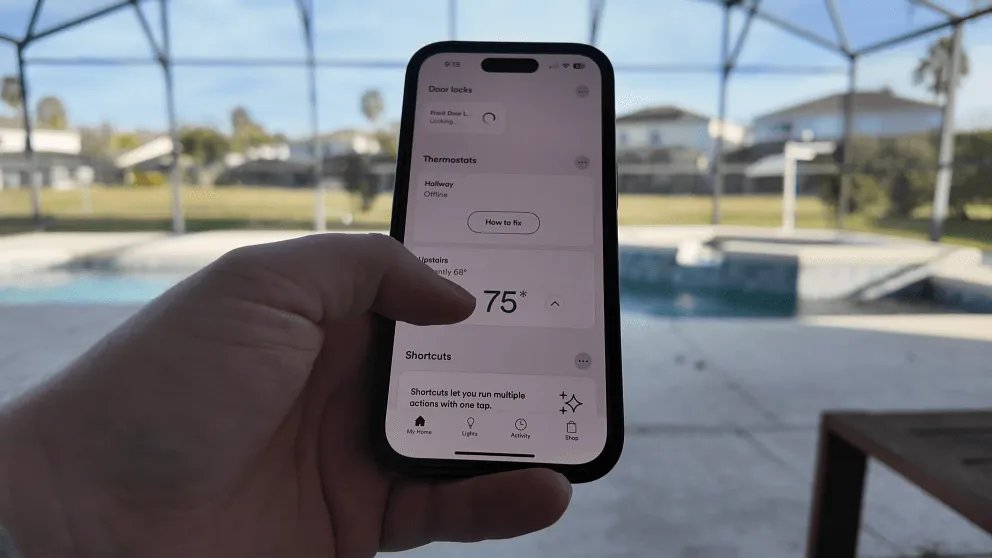
Controlling the Nest thermostat through the Vivint app.
If smart home security matters to you, get Vivint. Ring will get you basic sensor monitoring with some camera integrations, but it isn't a smart home hub.
Comparing The Ring App And Vivint App
This one is close to a tie. Both apps are good.
The Ring app is excellent. It's responsive, snappy, and easy to navigate. Camera feeds load quickly, notifications are clear (those AI descriptions help a lot), and the layout is clean. Ring also does a nice job of tying the alarm system and cameras together in one app, even though they're technically separate products.
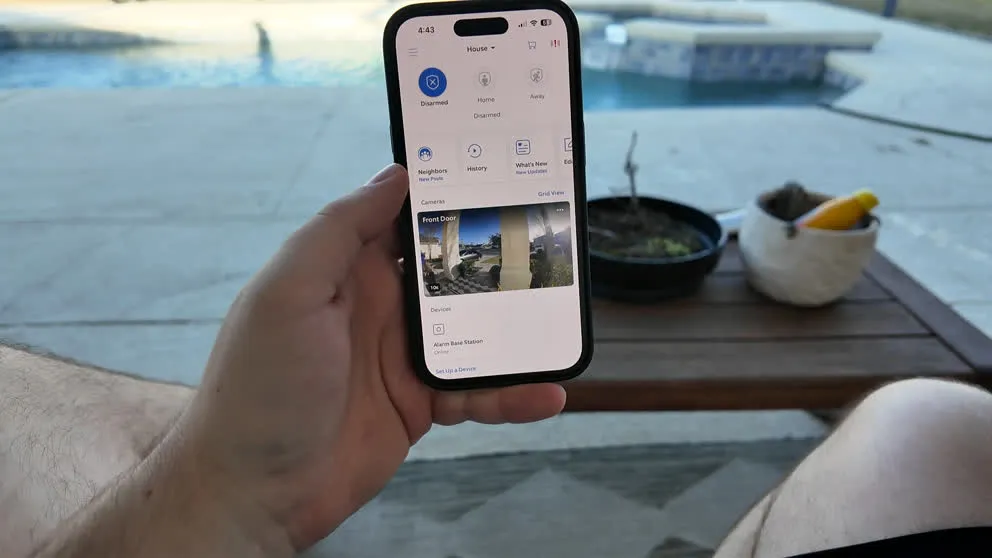
The Vivint app has a similar level of polish, but with more depth. Since Vivint handles smart home devices too, the app becomes a single hub for your entire home: cameras, alarm, door locks, thermostat, lights. The automations section is built right in, so you're not bouncing between apps.
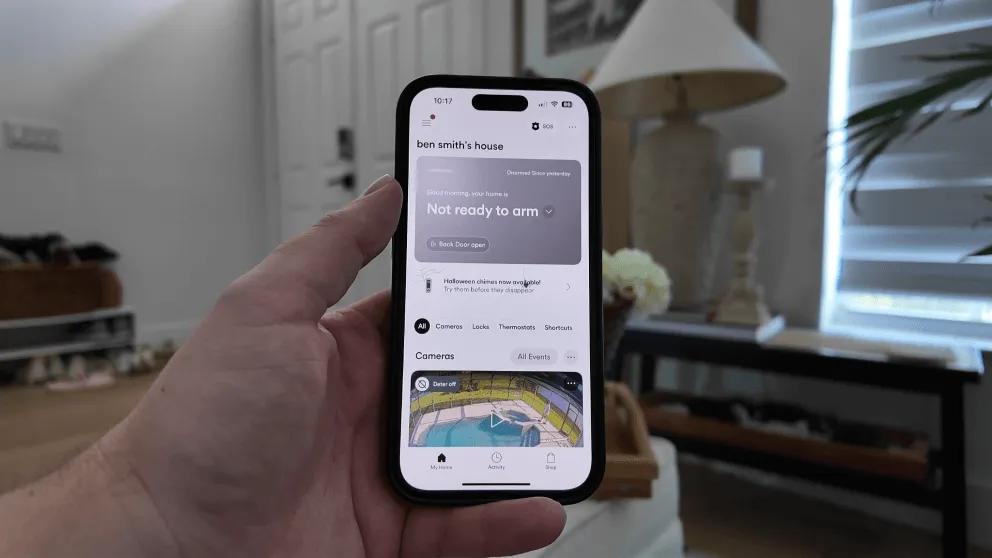
If you're only using the app for security (arm/disarm, cameras, notifications), both are great and you'll be happy either way. If you want smart home controls in the same app, Vivint gives you more.
Vivint vs Ring Pricing And Costs
Equipment Costs
Ring's Whole Home Enhanced Kit normally costs $530. I got it on sale for $367. You can add sensors for $20 to $40 each and cameras range from $60 (indoor) to $250+ (floodlight). Ring frequently runs sales, especially through Amazon, so watch for those.
Vivint packages start around $599, but I went with the full setup (cameras, door lock, thermostat, everything) and paid a little over $1,000. Vivint offers 0% APR financing for 42 or 60 months if you don't want to pay upfront. Just remember that financing locks you into the monitoring service for the duration.
Monthly Monitoring Costs
| Plan | Vivint | Ring |
|---|---|---|
| Core security monitoring | $29.99/mo | $20/mo |
| Security + smart home | $39.99/mo | N/A |
| Security + cameras | $49.99/mo | $20/mo (included) |
| Virtual Guard (live agent on cameras) | N/A | $99/mo |
Ring's base monitoring plan at $20 per month includes cloud storage for unlimited cameras, which is a great deal. With Vivint, camera access bumps you from $39.99 to $49.99, plus $5 per additional camera.
Where Ring gets expensive is the Virtual Security Guard at $99 per month. Vivint doesn't offer live agent camera monitoring, but its built-in deter mode (whistle, LED ring, floodlight) provides automated deterrence at no extra cost.
Pricing Verdict
Ring is cheaper across the board: lower equipment cost, lower monthly monitoring, and cameras included in the base plan. Vivint costs more but gives you professional installation, smart home automation, straight cellular monitoring, and cameras that record without Wi-Fi. If budget is the deciding factor, Ring wins easily.
Which Home Security System Should You Get?
Get Ring If You Want Affordable Home Security With Great Cameras
Pros
- Low Monthly Price
- Easy DIY Installation
- Excellent camera quality with night vision and two-way talk
- Video storage up to 180 days
- AI-powered notifications with descriptions
- Great mobile app — smooth, responsive, easy to use
Cons
- Camera Privacy Concerns Amongst Customers
- No touchscreen keypad
- No two-way talk through the panel
- Cameras don't record without Wi-Fi
- High equipment cost
- Limited Home Automation Features
- Not compatible with Nest thermostat
Ring is the right pick if you want reliable home security at a lower price point with an excellent selection of cameras. The DIY installation is easy, there's no contract, and the $20 per month monitoring plan includes cloud storage for all your cameras. If you already own Ring cameras and want to add alarm monitoring, Ring Alarm is a no-brainer.
The Ring app is one of the best I've used. The AI-powered notifications that describe what triggered the alert are a real help. And since Ring cameras aren't proprietary, you keep them working even if you cancel the monitoring service.
The trade-offs: no touchscreen panel, limited smart home automation, cameras that don't record without Wi-Fi, and no two-way voice through the base station. If those things don't bother you, Ring is a solid system for the price.
Check Ring's current offers here.
Get Vivint If You Want The Best Smart Home Security System
Pros
- Month-to-month contract option
- Professional Installation
- Advanced Equipment & Feature Set
- Excellent mobile app
- Touchscreen keypad
Cons
- Higher monthly cost
- Financing locks you into a service agreement
- Equipment can be expensive upfront
- Cameras are proprietary and stop working if you cancel
Vivint is the better system overall. A pro installs it, so everything is done right the first time, and the touchscreen panel is more intuitive than Ring's basic keypad. You can control locks, thermostats, and lights from the same app as your alarm. The cameras look better and keep recording when Wi-Fi goes down, and the straight cellular connection means faster, more reliable communication with the monitoring center.
The trade-off is cost. Vivint's equipment is more expensive, the monthly monitoring is higher, and financing effectively locks you in. But if you're a homeowner who wants the full smart home security experience with professional installation, Vivint is worth the premium.
If your house already has an existing hardwired security system from a previous owner, Vivint can integrate those sensors and save you on equipment costs. Ring can too, but the DIY hardwired takeover is tricky.
Check Vivint's current offers here.
The Bottom Line
For budget-conscious buyers who want solid security monitoring with great cameras and no strings attached, Ring is the move. You get low equipment costs, $20/mo monitoring, no contract, and the biggest camera selection I've seen.
For homeowners who want the full smart home security package with professional installation, a touchscreen panel, straight cellular monitoring, and home automation, Vivint is worth the extra money.
Both systems monitor 24/7 for police, fire, and medical, so neither is a bad choice. It comes down to how much you want to spend and whether smart home features matter to you.
Are Vivint cameras better than Ring?
Vivint cameras have better video quality, a more stable connection, and they keep recording without Wi-Fi. Ring cameras stop recording entirely when Wi-Fi goes down. But Ring offers more camera models with battery options, and Ring cameras aren't proprietary, so you keep them if you cancel. Both camera systems have HD video, night vision, and two-way talk.
Is Vivint like Ring?
They're both home security systems, but the approach is completely different. Vivint is a premium, professionally installed system with smart home automation and a touchscreen panel. Ring is an affordable DIY system with a push-button keypad and limited automation. Vivint costs more but does more. Ring costs less and keeps things simple.
Why is everyone getting rid of Ring cameras?
Some people have moved away from Ring cameras due to privacy concerns around how Ring handled video data and law enforcement requests in the past. Ring has since updated their privacy policies and added end-to-end encryption as an option. The cameras themselves are still well-reviewed for video quality and ease of use.
Do burglars avoid Ring cameras?
Visible security cameras tend to deter burglars. Ring cameras with their distinctive design are recognizable, which can work as a deterrent. Ring's motion-activated lights (on Spotlight and Floodlight models) add another layer. That said, no camera system is burglar-proof. Pairing cameras with a monitored alarm system gives you the best protection.
Does Ring require a contract?
No. Ring is completely month-to-month. You can cancel whenever you want with no penalty. There's even a free self-monitoring option if you don't want to pay for professional monitoring at all. Vivint is also month-to-month if you pay for equipment upfront, but financing locks you into the service for the duration of the loan.
Can Ring use existing home security sensors?
Ring can take over an existing hardwired security system using a retrofit kit, but the process isn't DIY-friendly. It's doable, but tricky. Ring cannot use wireless sensors from other companies. Vivint can use hardwired systems and most wireless sensors from other brands like Honeywell, and their technician handles the setup for you.
How much does Vivint cost per month?
Vivint starts at $29.99 per month for core security monitoring with the app. Smart home automation bumps it to $39.99. Adding cameras brings it to $49.99 per month, plus $5 for each additional camera beyond the first. Ring starts at $20 per month with cameras included.
Is Ring or Vivint better for renters?
Ring is better for renters. It's completely wireless with peel-and-stick sensors and battery-powered camera options. There's no drilling, and you can take it with you when you move. Vivint requires professional installation that involves drilling for outdoor cameras, which isn't ideal for rentals.
Does Ring work with Nest thermostat?
No. Ring Alarm is not compatible with Nest thermostats. It supports some Z-Wave thermostats, but the range of compatible devices is limited. Vivint works with the Nest thermostat and any Z-Wave compatible smart home device.
Can I use Ring cameras with Vivint?
No. Ring cameras only work within the Ring ecosystem. Vivint uses its own proprietary cameras. You can't mix and match cameras between the two systems. If you already have Ring cameras and want to add a security system, Ring Alarm is the most seamless option.
About the author
