
How to Permanently Bypass an ADT Zone
Need to bypass a zone on your ADT alarm? Here's how to do it from the command panel step by step.

If you have an ADT home security system and a sensor keeps faulting, you'll need to bypass that zone before the system will let you arm. Maybe your new house has ADT already installed and one of the sensors is on a door that doesn't shut right. Or a window sensor lost its magnet and the panel beeps every time you try to set it. I get this question a lot, so I put together a quick walkthrough.
Here's how to bypass a zone on the ADT Command system, how to clear it, and what to do if you want that zone gone for good.
What Does Bypassing an ADT Zone Mean?
When you bypass a zone, you're telling the security system to skip that specific sensor when arming. The system pretends it doesn't exist. Your security cameras, smart home features, and every other sensor keep working normally. Only the bypassed zone gets excluded.
This is useful when a sensor is faulted or broken and you still want the rest of your home security system armed and active. It's also a common fix when you first move in and inherit sensors that aren't positioned correctly.
How to Bypass a Zone on the ADT Command Panel
From the command panel, here's how to do it:
- Go to the Zones page
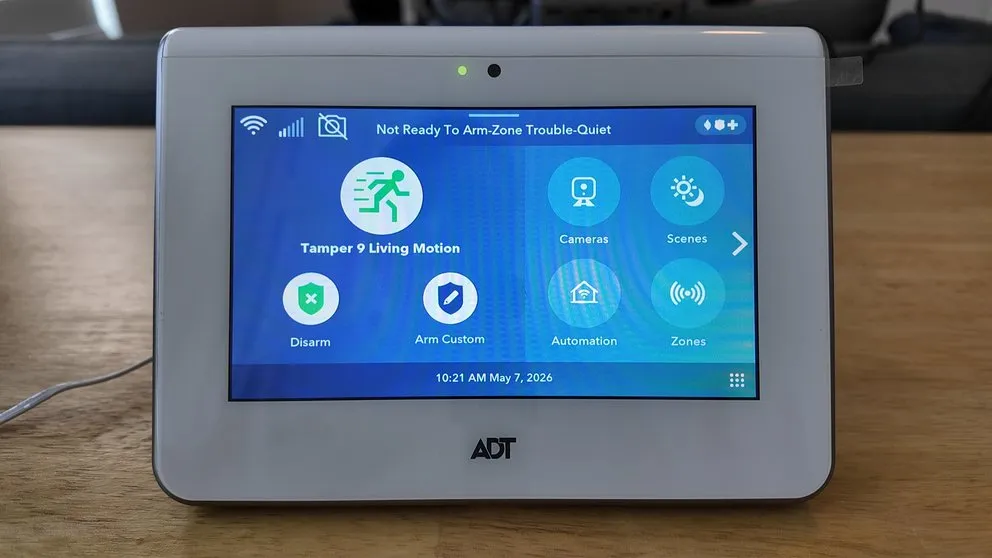
Press the button in the bottom right corner. - Select the sensor you want to bypass
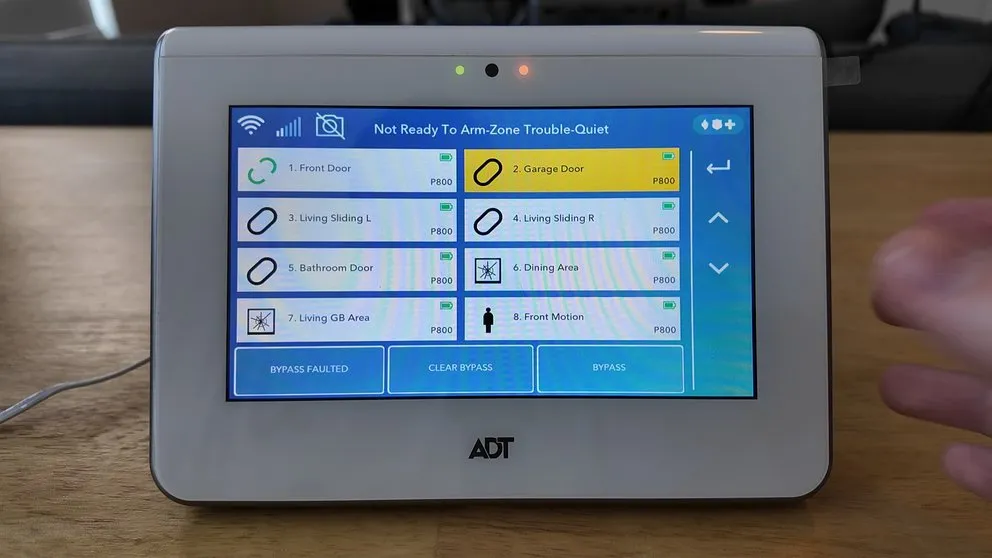
Simply tap the sensor. You can select more than one.
- Tap Bypass
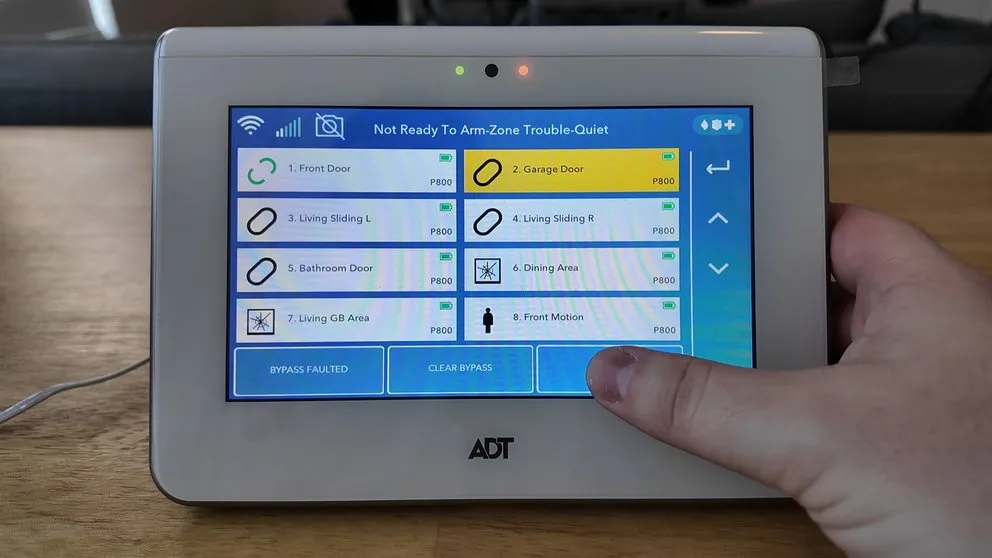
Select the bypass button in the bottom right. - Enter your PIN
You'll know it worked when a Do Not Enter icon appears next to the sensor emblem. That icon means the zone is bypassed and won't trigger an alarm when you arm the system.
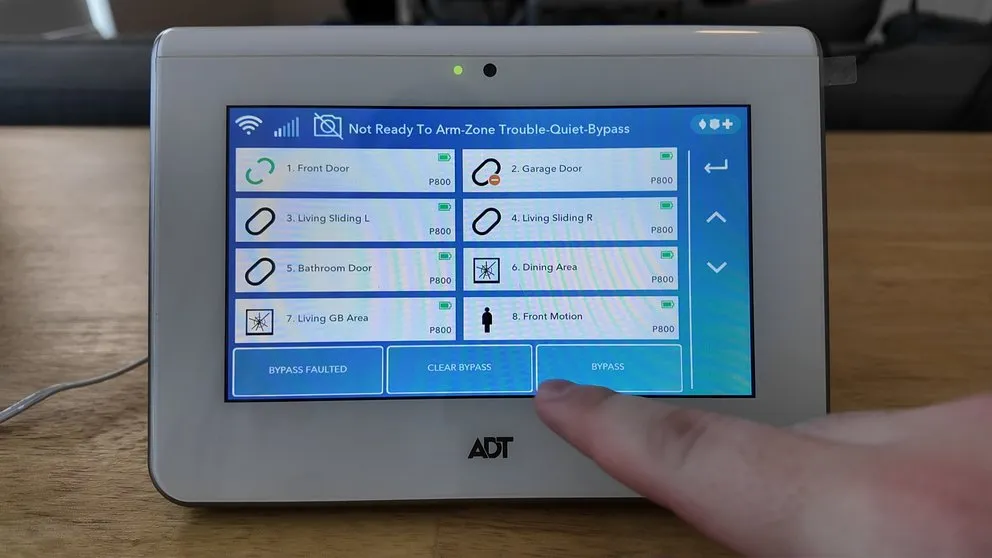
The Do Not Enter icon confirms the zone has been successfully bypassed
Something that can be misleading: if you enter the wrong PIN, the panel won't display an error code or give you any indication that something went wrong. The only way to tell your PIN didn't work is that the Do Not Enter icon won't show up. If everything looks the same after tapping Bypass, try entering your PIN again.
How to Clear a Bypassed Zone
If you need to bring a sensor back online after bypassing it:
- Go to the Zones page
- Tap Clear Bypass
- Enter your PIN
The Do Not Enter icon disappears and the sensor starts reporting normally again. Alarm events on that zone will go through to ADT's monitoring center like usual.
Why You Might Need to Bypass a Zone
A few common situations where bypassing makes sense:
- A sensor is faulted and the system won't let you arm until it's resolved
- You're doing work on the house and a door or window needs to stay open for a while
- A sensor keeps triggering false alarms every time you arm
- The sensor is on an entry point you no longer use
Bypassing keeps everything else fully protected. It's a targeted fix, not a system-wide change. I usually recommend it as a first step when troubleshooting a problem sensor.
How to Bypass a Zone from the ADT App
You can also bypass zones through the ADT app on your phone. Open the app, go to your security system, find the zone you want to skip, and toggle the bypass on. You'll still need to confirm with your PIN.
If the app gives you trouble or you can't get it to go through, do it directly from the panel instead. The panel doesn't depend on your WiFi connection, so it's more reliable for this kind of thing.
When to Call ADT Support
If you're bypassing the same zone every single day just to avoid unnecessary alerts, the sensor probably needs to be replaced or removed from the system entirely. Call ADT security support at (800) 238-2727 and they can troubleshoot the issue, check for problems on their end, or send a tech out to replace it. Have your panel's model number ready before you call so they can pull up your system info.
For a truly permanent fix, their support team can remove the zone from your panel's programming so you never have to deal with it again. Bypassing works well as a short-term solution, but if the sensor itself is broken, get it taken care of so your security system is fully protected.
About the author
